 Ripple
Scrolling Between Sets and on Walks, Kids Gaming Instead of Playing Outside
Most people take their phone to the gym. Music, the training plan and the set log are all on it. The trouble starts during rest. A one minute break turns into two short videos and then ten minutes. Walks and runs go the same way, you stop to reply to a message and then keep watching. Parents see it too. The plan was an afternoon of basketball, and the kid ends up on the bench playing a game. Ripple can close only short video and game apps during that time while music, run tracking and calls keep working. The first part below is for adults, the second part is for parents, and both Android and iPhone are covered.
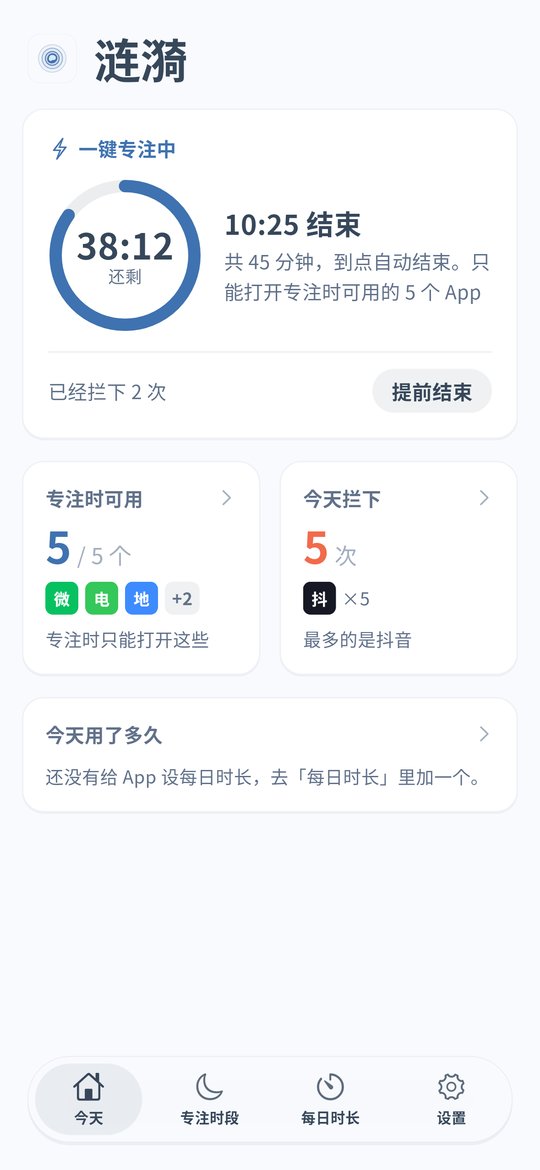
What quick focus looks like (Android v0.1.8, Chinese interface)
Adults: keep the phone for music and sets, close the short videos
Tap quick focus before the gym
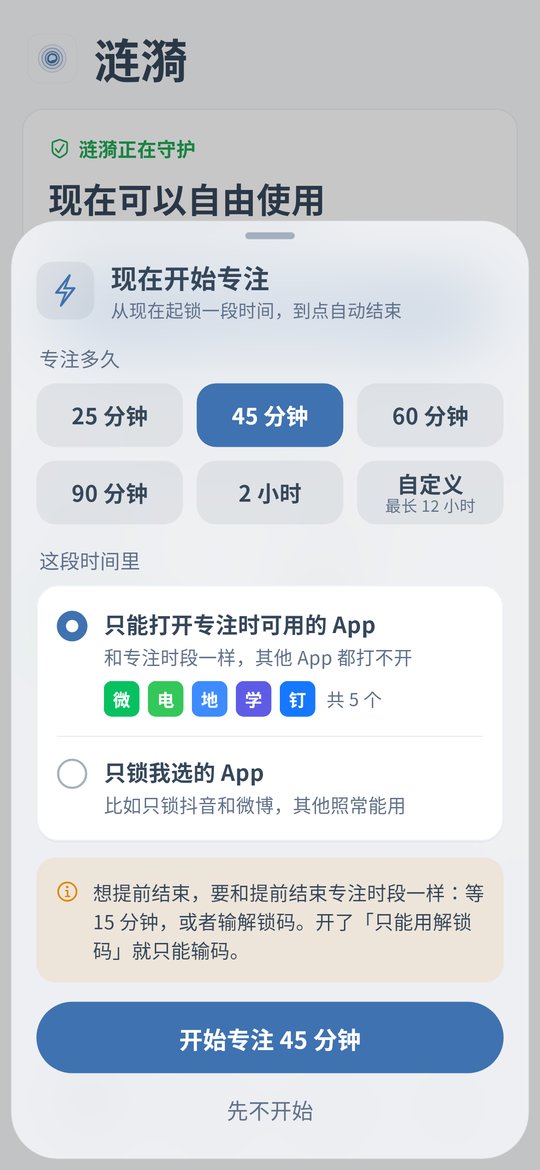
On the home screen tap Start focus now and pick 60 minutes or a custom length from 15 minutes to 12 hours. Choose Lock only the apps I pick and add TikTok, Instagram or whatever pulls you in. Music and workout apps stay open.
Short videos between sets get blocked
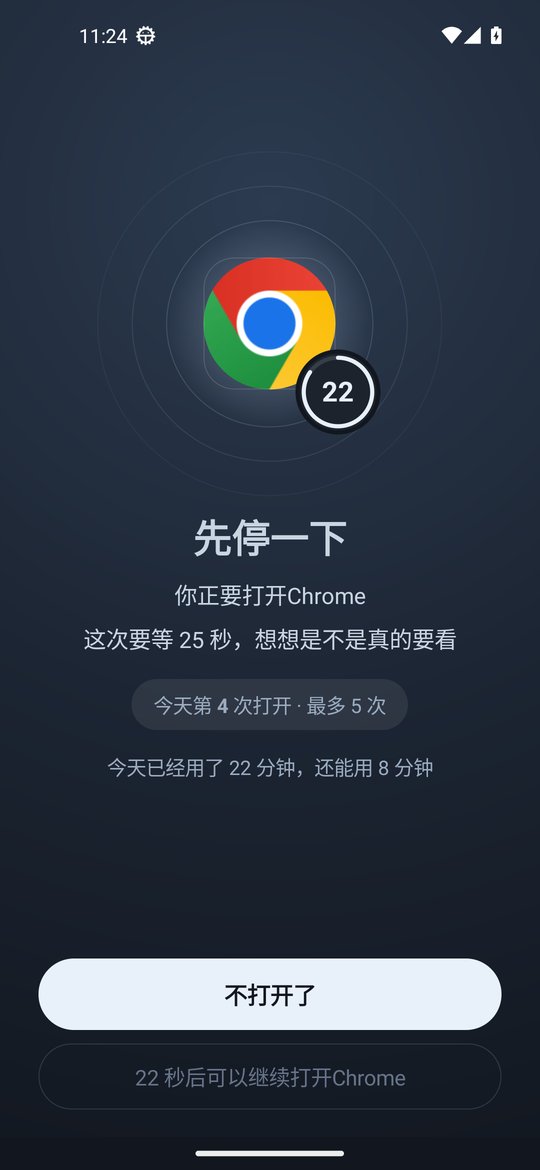
Opening a locked app during focus shows the block screen. Ending early needs a wait, 15 minutes by default, or the unlock code. Changing the phone clock does not end it early.
Fixed workout days work better as a schedule
If you train Monday, Wednesday and Friday from 7 to 8 pm, create a focus schedule for it and it starts on its own.
Checking the phone on walks? Limit opens
Give the app you reach for most a daily open limit and a 5 to 30 second pause before it opens. Many people put the phone back while they wait.
If you tend to switch it off, use strict mode
With strict mode on, loosening rules needs the unlock code. The code is at least 8 digits, so give it to your partner or a gym friend. Strict mode also turns on Anti-Uninstall, and if the code is lost you can request removal and wait 72 hours.
iPhone: schedule your workout hours
The iPhone version is v0.1.5 and has no quick focus or open limits. Put short video apps into a schedule for your workout hours and iOS blocks them in the background while music and maps stay usable. The unlock code works there too.
Parents: the plan was to play outside, the kid is still on the phone
Start quick focus before they head out
On a child's Android phone, start a 90 minute quick focus before ball games or bike rides. Choose Lock only the apps I pick and add games and short videos. Calls and chat stay open so you can reach them.
Make Saturday afternoon an outdoor schedule
Create a focus schedule for Saturday 2 to 5 pm. Games and short videos close on time without a talk at the door every week.
A game only opens a few times a day
Give a game 3 opens a day. When they are used up it will not open again until midnight.
Split screen and floating windows do not get around it
From Android v0.1.8, a blocked app in split screen, a floating window or picture-in-picture is blocked too. On OPPO phones a floating window is covered and its sound stops, though the window itself has to be closed by hand.
Changing the clock or uninstalling does not help
Android timing uses device uptime, so moving the clock forward ends nothing early. See the clock change page. With Anti-Uninstall on, removing Ripple needs the cooldown or your code.
iPhone: block by outdoor time and bedtime
On a child's iPhone, block games and short videos during weekend outdoor time and bedtime. With the block on deleting apps turned on, long press removal does not work. See the iPhone page.
Setup steps (Android v0.1.9)
Install or update to v0.1.9
Install the latest APK and turn on the accessibility service. With an older version, update from Settings › About › Check for updates and your rules stay.
Tap Start focus now on the home screen
Pick a length. Custom moves in 1 minute steps with 15 minutes minimum.
Choose Lock only the apps I pick
Add short video, short drama and game apps. Leave out music, run tracking, maps and the phone app.
Use a focus schedule for fixed workout times
Create one by weekday and time. It starts and ends on its own.
Set the unlock code and strict mode if you want
On your own phone give the code to family or a friend. On a child's phone keep it yourself. With strict mode on, ending early needs the code.
FAQ
How do I block only short videos at the gym and keep music?
Use quick focus in Ripple for Android and choose Lock only the apps I pick. Add only short video and game apps. Music and workout apps you leave out keep working, and calls always work.
How short can quick focus be, and does it end on its own?
15 minutes minimum and 12 hours maximum, in 1 minute steps. It ends on time and does not repeat daily.
What if I want to stop halfway through a workout?
You wait first, 15 minutes by default, or enter the unlock code. In strict mode only the code works.
Can it start on its own on my gym days?
Yes. Create a focus schedule with the weekdays and times. Schedules work on both Android and iPhone.
My kid goes out to play and still games. What can I do?
On a child's Android phone, start quick focus before they leave or create a weekend outdoor schedule, and give games a daily open limit. Keep the unlock code and turn on Anti-Uninstall.
Does iPhone have quick focus?
Not yet. iPhone v0.1.5 has schedules, the block on deleting apps, clock change protection and the unlock code. Quick focus, daily limits, open limits and strict mode are Android only.
Does it cost money or need an account?
It is free with no ads and no account. Settings stay on the phone.