 Ripple
Scrolling Your Phone While Your Kid Does Homework
In a lot of homes the evening looks the same. The kid sits at the desk with homework, and the parent sits nearby to keep them company while scrolling short videos. The kid sees it and reaches for their own phone after two problems. Some adults also come home wanting to read or study, pick up the phone to answer one message, and put it down an hour later. Ripple can close the distracting apps on both the adult's and the kid's phone during homework and study time. The first part below is for adults, the second part is for parents, and both Android and iPhone are covered.
Quick focus (Android, Chinese interface)
Adults: put your own phone down during homework time
Start a quick focus when your kid sits down
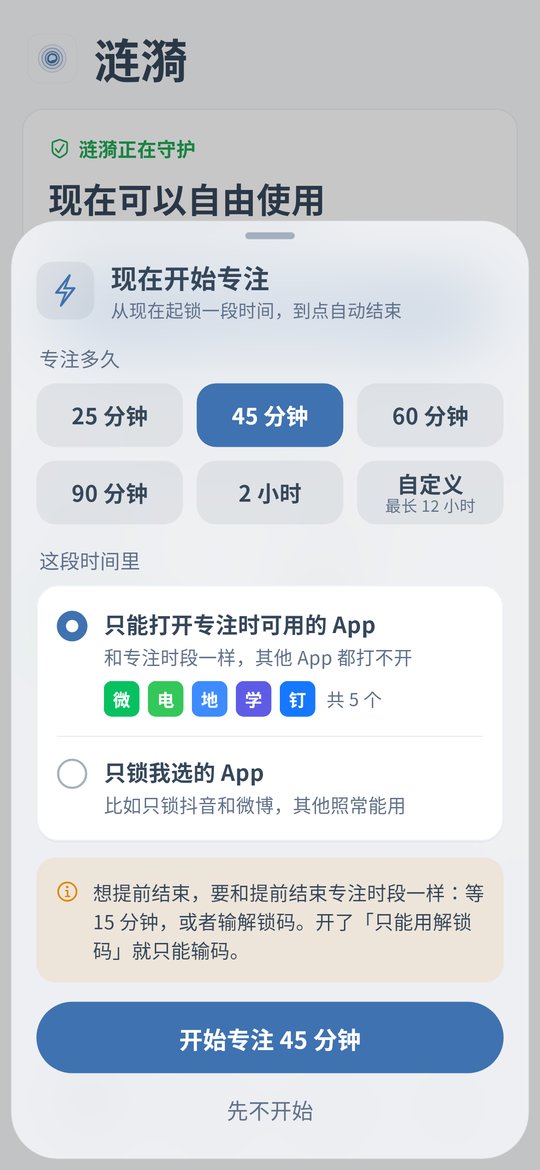
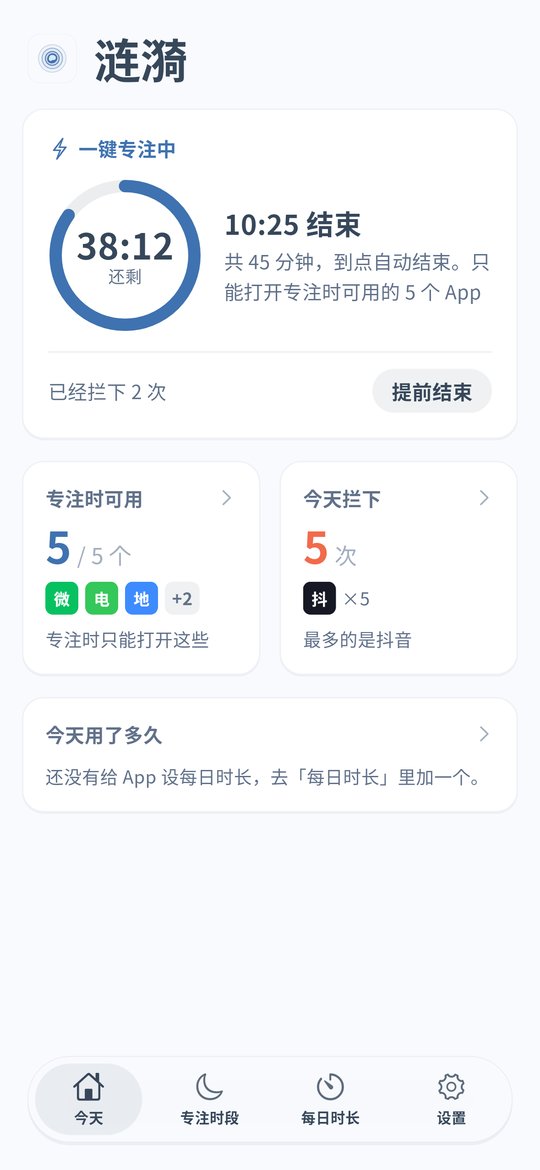
On the Ripple for Android home screen, tap quick focus and pick 60 or 90 minutes, or a custom length of at least 15 minutes. Choose Lock only the apps I pick and add short video and game apps. Calls, chat and work apps keep working.
Add a schedule for a fixed study time
If homework happens from 7:30 to 9 pm on weekdays and you want to read or study then too, add a focus schedule for that time. It starts by itself every day.
Give a daily open limit to apps you open again and again
Some apps only take a minute each time but get opened many times a night. In Daily limits, set how many times the app can open each day and a 5 to 30 second pause before it opens. The screen shows which open this is today.
Give short videos a daily time limit
If you want to scroll a bit after the kid is in bed, give short video apps 30 minutes a day. From v0.1.9 any length from 1 minute to 12 hours works in 1 minute steps. When it is used up the app will not open until midnight.
If you tend to change settings, use strict mode
With strict mode on, loosening rules needs the unlock code. The code is at least 8 digits and your partner can keep it. Strict mode also turns on Anti-Uninstall, and if the code is lost you can request removal and wait 72 hours.
iPhone: block by schedule
The iPhone version is v0.1.5 and has no quick focus, open limits or daily limits. Put short video and game apps into an evening study schedule and iOS blocks them in the background. The unlock code works there too.
Parents: kids sneaking their phone during homework
Start a quick focus before homework
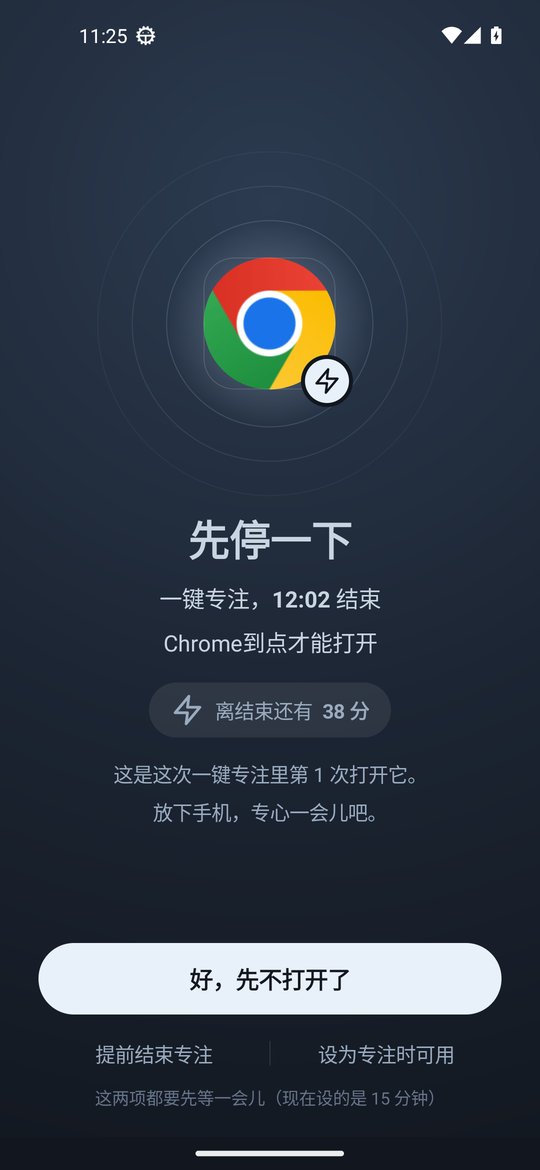
On a child's Android phone, start a 60 minute quick focus before homework. By default only the apps in Allowed during focus can open, such as calls, chat and study apps. Opening anything else shows a pause that asks them to get back to work.
Close apps during homework every day
If homework time is regular, add a schedule from 6:30 to 9 pm on weekdays with short video and game apps in it.
Split screen and floating windows are blocked too
If a child puts homework and a video side by side in split screen, the blocked side gets covered. A blocked app in a floating window or picture-in-picture is blocked too. On OPPO phones a floating window is covered and its sound stops, though the window itself has to be closed by hand.
Leave a little time after homework
A full ban often turns into a fight. Give games 3 opens a day or 30 minutes a day. Before exams you can set them to 0 minutes so they never open.
They cannot change settings or uninstall
With strict mode on, loosening rules needs the unlock code you keep, and Anti-Uninstall turns on. Android timing uses device uptime, so changing the clock does not help. See the clock change page.
iPhone: block during homework time
On a child's iPhone, put short video and game apps into a homework schedule and turn on the block on deleting apps so long press removal does not work. See the iPhone page.
Setup steps (Android v0.1.10)
Install or update to v0.1.10
Install the latest APK and turn on the accessibility service. With an older version, update from Settings › About › Check for updates and your rules stay.
Set the apps in Allowed during focus
Add calls, chat and the apps needed for study or work. To block only a few apps instead, choose Lock only the apps I pick.
Add a daily homework schedule or tap quick focus
Use a schedule if the time is fixed. Otherwise tap quick focus each time you sit down.
Set the unlock code and strict mode if you want
Give your own code to your partner. On a child's phone keep the code yourself. With strict mode on, loosening rules needs the code.
FAQ
I keep scrolling while my kid does homework. What can I do?
When your kid sits down, start a 60 or 90 minute quick focus in Ripple for Android and choose Lock only the apps I pick to close short video and game apps while calls and chat keep working. For a fixed time, add a daily focus schedule. iPhone v0.1.5 can block by schedule.
How do I stop my kid using the phone during homework?
On a child's Android phone, start a quick focus that allows only study apps, or add a daily homework schedule. Split screen, floating windows and picture-in-picture are blocked too. Turn on strict mode so only your unlock code can loosen rules, which also turns on Anti-Uninstall. On a child's iPhone use schedules and the block on deleting apps.
My kid needs the phone for research and online classes. Will those be blocked?
Ripple works on apps. Put homework, dictionary and online class apps into Allowed during focus and they keep working. Ripple cannot block one website inside a browser.
Can a quick focus end early?
Yes, after a wait, 15 minutes by default, or with the unlock code. Quick focus uses device uptime, so changing the clock does not end it early.
Does iPhone have quick focus?
Not yet. iPhone v0.1.5 has schedules, the block on deleting apps, clock change protection and the unlock code. Quick focus, open limits, daily limits, 0 minutes and strict mode are Android only.
Does it cost money or need an account?
It is free with no ads and no account. Settings stay on the phone.